UI Overview
The Event Registration Platform includes an administrative dashboard designed for fast participant lookup, packet delivery, and operational clarity during race-day workflows. The interface uses a dark-themed React.js + Inertia.js layout that is optimized for scanning, searching, and confirming registrations in seconds.
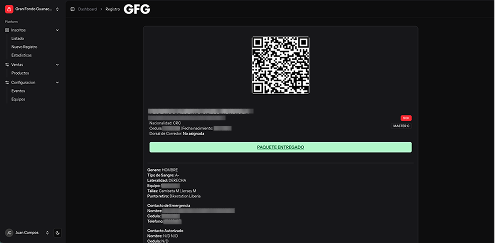
Registration Detail View
The registration detail screen is purpose-built for the moment a participant arrives to pick up their race packet.
Key Features
-
Large QR Code
Allows instant scanning at pickup stations. -
Participant Summary Box
Includes identification details, distance/category, and registration metadata. -
Status Indicator
A badge (e.g., “Entregado”) shows whether the packet has already been delivered. -
Action Button
A prominent confirmation button used to mark the packet as delivered. -
Detailed Information Panel
Contains:- Gender
- T-shirt size
- Emergency contact
- Category assignment
- Pickup location
- Payment method
- Additional metadata
The composition is intentionally minimal, favoring readability and fast interaction.
Screenshot
Registrations List View
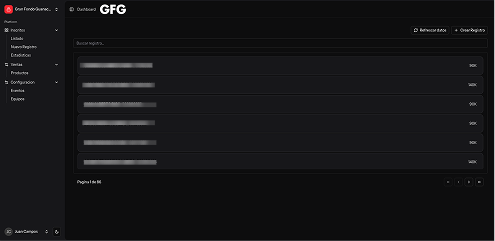
This interface is used heavily during high-traffic windows, such as pre-race packet delivery or day-of check-in.
Key Features
-
Search Bar
Allows real-time filtering by name or identification number. -
Compact List Rows
Each row includes participant info with a quick “Ver” (view) action. -
Pagination
Controls at the bottom support large datasets. -
Clear Layout and Dark Theme
Designed for readability on tablets, laptops, and mobile workstations used at events.
This view enables staff to rapidly locate participants and open their detail record in a single click.
Screenshot
UI Goals
The interface was designed around four practical requirements:
-
Speed
Lookups and packet confirmations should require as few interactions as possible. -
Clarity
Strong contrast, consistent spacing, and a predictable layout reduce operator fatigue. -
Reliability
QR codes, confirmation buttons, and searchable datasets ensure accurate packet handling. -
Workflow-Fit
Every screen reflects the real-world flow of event operations: search → view → confirm.
This UI overview summarizes the administrative experience used during event preparation, packet pickup, and participant management.